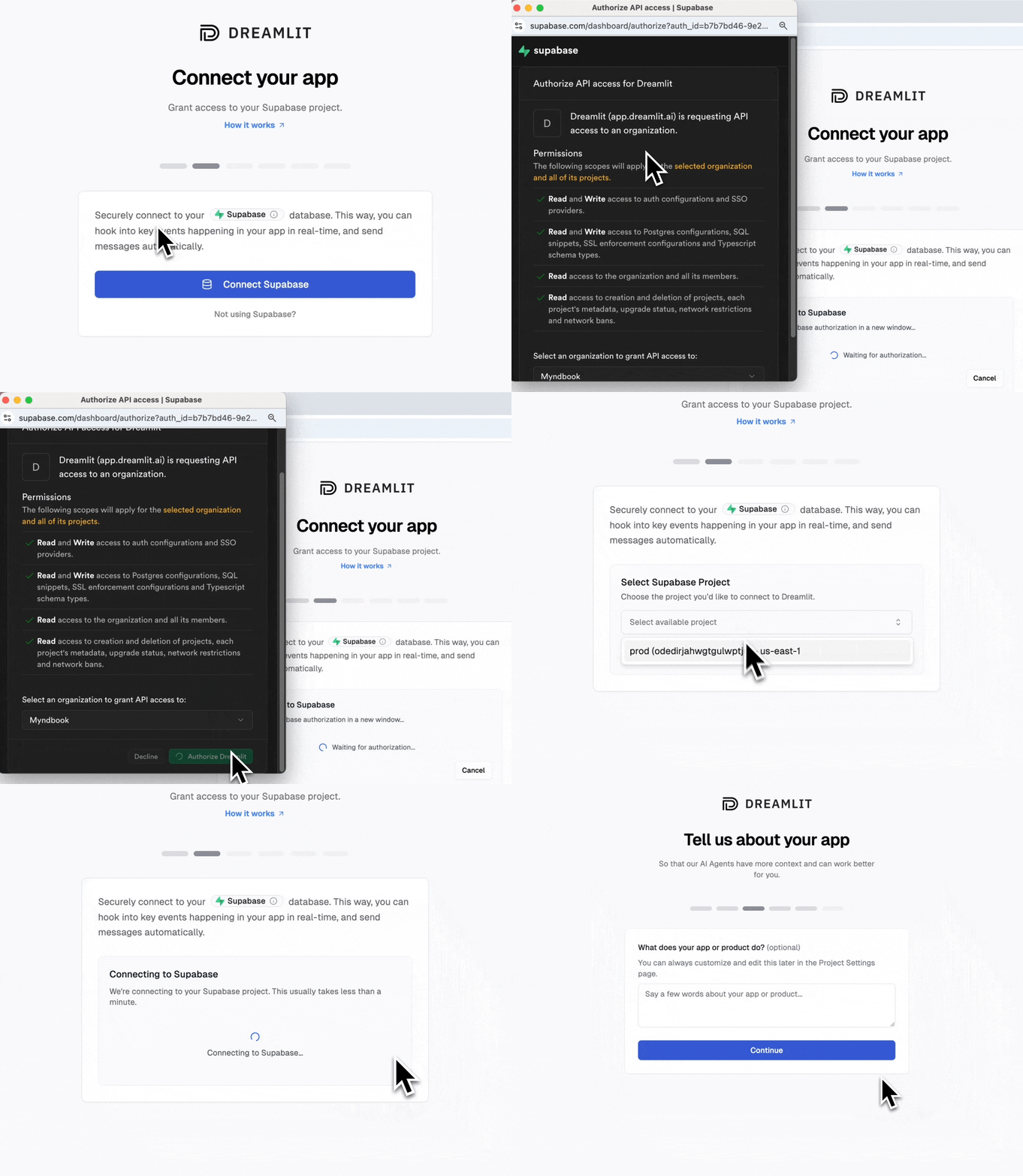
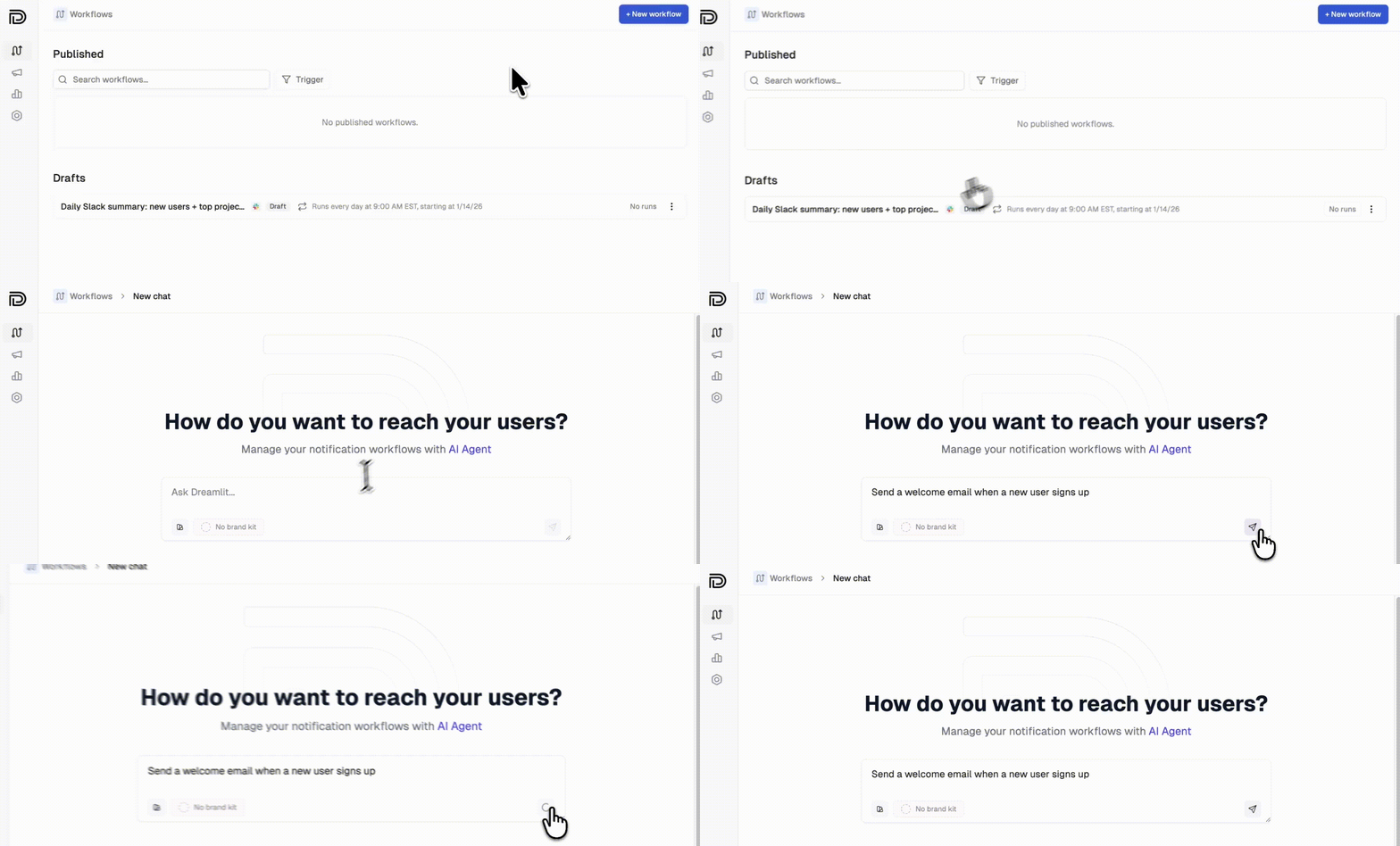
You built your entire app by describing it. Email should work the same way.Dreamlit connects to the Supabase project your Lovable app already uses. There’s nothing to prompt in Lovable, no API key to configure, no Edge Function to deploy. Tell Dreamlit what you need (“send a welcome email when someone signs up”) and it generates the trigger, template, and copy. Two clicks to connect, one prompt to create your first workflow.
Because Dreamlit sits on top of your database rather than your app code, your Lovable credits stay focused on building features. Email lives entirely outside your Lovable project.
Lovable’s AI will wire up Resend if you ask. But a raw email API only covers delivery. Everything else (templates, scheduling, tracking, drip sequences) is still on you to build, and every feature burns more Lovable credits.
Challenge
With Lovable alone
With Dreamlit
Email blasts, recurring emails, and drip sequences
No easy way to send one-off blasts, digests, or drip sequences. You’d need to export user data to another platform, and there’s no good UX to understand or safely verify recurring workflows before publishing.
AI-powered workflow builder goes from prompt to end-to-end email workflow in seconds. Fully preview and test every step with live data before going live.
Full visibility
Dig through code logs to check if emails sent. Aggregate raw data yourself to understand performance. Email logic scattered across your codebase makes it hard to see your communication strategy.
Complete visibility into email delivery, performance, and workflow previews, all in one place.
Vendor lock-in
The more email infra you build in Lovable (edge functions, crons, webhooks), the harder it is to migrate away.
Decouples email from app code, so you can move your app’s infra to a different provider while keeping all email workflows intact.
Lovable credit usage
Every email feature you build burns valuable Lovable credits.
Offload email to Dreamlit so you can focus your credits on building your app.
Our recommendation: Use Lovable for what it does best: building your app. Use Dreamlit to help you manage your email strategy so you can maximize engagement, reduce churn, and grow your business.
A Lovable app connected to your own Supabase project (not Lovable Cloud)
5 minutes
Heads up: If you started your Lovable project with Lovable Cloud, currently you have no way of connecting directly to your own database, so you cannot connect your app to external services like Dreamlit. You’ll need to migrate your Lovable Cloud to your own Supabase project first (see below).As such if you’re starting a new Lovable project, we highly recommend connecting your own Supabase account rather than using Lovable Cloud as your backend so you can avoid vendor lock-in and get the full suite of features that Supabase offers including direct database access.
If you started with Lovable Cloud (their managed backend), you’ll need to migrate to use Dreamlit. Lovable Cloud doesn’t currently provide direct database access, which Dreamlit requires.Your options:
Migrate to your own Supabase (recommended for production)
Use our free, open source Lovable Cloud to Supabase Exporter to move your tables, users, and storage files to your own Supabase project. No password resets required.
Use the hosted Lovable Cloud to Supabase Exporter on dreamlit.ai, or view the source on GitHub and self-host it if you prefer.
Start fresh with your own Supabase
If you haven’t launched, this is the cleanest path
Step 1: Create the workflow or broadcast in Dreamlit
Click Create Workflow (or Create Broadcast) and describe what you want:
“Send a welcome email when a new user signs up”
The AI Agent builds you a workflow, end-to-end: from trigger, email template, and copy. No need to prompt anything in Lovable or configure anything manually in your database. Take a look at the preview and if all looks good, you can click Publish to take the workflow live.
Chances are your database already stores the data you need to build your workflow. If not, and you need to add a field or table for Dreamlit to watch, simply prompt Lovable to persist the events or data you need (a good practice anyway so your database is the source of truth). For example:
“When a user clicks the Like button, add a row to the comment_likes table”
Or for something like order confirmations:
“When a user completes checkout, insert a row into the orders table with the order details”
If you’re using Lovable’s default user management (Supabase Auth), then users are automatically added to the auth.users table when they sign up. No extra table needed.
Step 3: Analyze workflow runs, email engagement, and optimize engagement
You can navigate to the Workflows page to check the status of recent workflow runs, inspect emails that went out as a result of those runs, as well as engagement metrics by recipient and workflow.
Dreamlit triggers emails based on database changes. When prompting Lovable, focus on getting data into your database. Dreamlit handles the rest.Good prompts for Lovable:
You want…
Prompt Lovable with…
Order confirmations
”Insert order details into orders when checkout completes”
Comment notifications
”Save comments to a comments table with the post_id and author”
Activity alerts
”Log user actions to an activity table”
You don’t need to prompt Lovable about emails at all. Just make sure the data lands in your database, and Dreamlit takes it from there.
Any workflow that triggers on a database change. Check out our use cases for example prompts across welcome emails, order confirmations, reminders, internal alerts, and more.
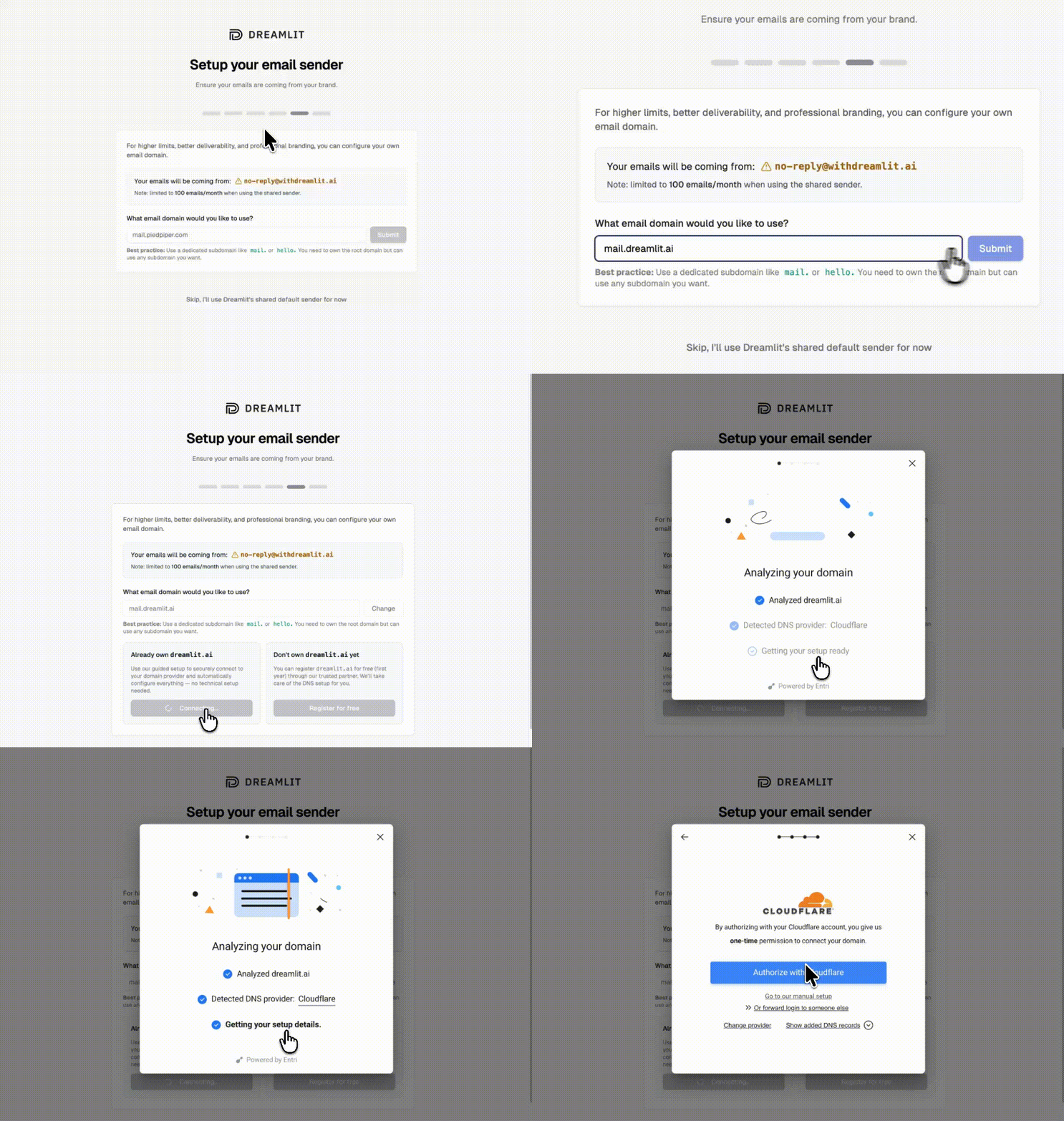
By default, emails send from Dreamlit’s domain. To send from your own domain (like hello@yourapp.com), set up a custom email domain in minutes.
1
Add your domain
Go to Settings → Email Domains and click Add domain. Enter your domain (we recommend a subdomain like mail.yourapp.com).
2
Verify automatically
Dreamlit can automatically configure your DNS records for you. Just click Verify with your DNS provider, sign in to your provider, and authorize the changes.
Automatic DNS setup, no manual records needed
If your DNS provider isn’t supported for automatic setup, you can add the records manually. Dreamlit shows you exactly what to add.
3
Start sending
Once verified, select your domain when creating email workflows. Your emails will now come from your own brand.
Is your workflow published? Saved workflows don’t run until you click Publish.
Is the trigger table correct? Lovable might have named tables differently than you prompted. Check your Supabase dashboard to see the actual table names.
Is data being written? Check your Supabase dashboard to confirm rows are being created when users take actions.
Try the preview. Use the preview to test with sample data and verify the workflow runs.
Usually no. Dreamlit reacts to database changes, so if your app already writes the data you need, you’re all set. If you need to track something new (like order completions), just prompt Lovable to add the database write.
Yes. Your email workflows live in Dreamlit, separate from your Lovable app. Change copy, tweak templates, adjust triggers — all without touching your app code or prompting Lovable again.
Yes. Dreamlit supports Slack alongside email. Just describe what you want: “Notify our team on Slack when a new order comes in.” Learn more about Slack →
Use the preview feature to send test emails to yourself with real data from your database. Your workflow won’t email actual users until you publish it.
What if I’m already using Resend, SendGrid, or another email provider?
Dreamlit works alongside traditional email providers. Since Dreamlit takes a fundamentally different approach (database-driven, AI-generated workflows), you don’t need to migrate off your existing setup. Try Dreamlit for your next workflow and keep using your current provider for everything else.