How to Send Emails from Supabase (Beyond the 2/Hour Limit)
Supabase caps you at 2 emails per hour out of the box. Here's how to set up auth, transactional, and scheduled emails that actually scale.

Ajay Sohmshetty
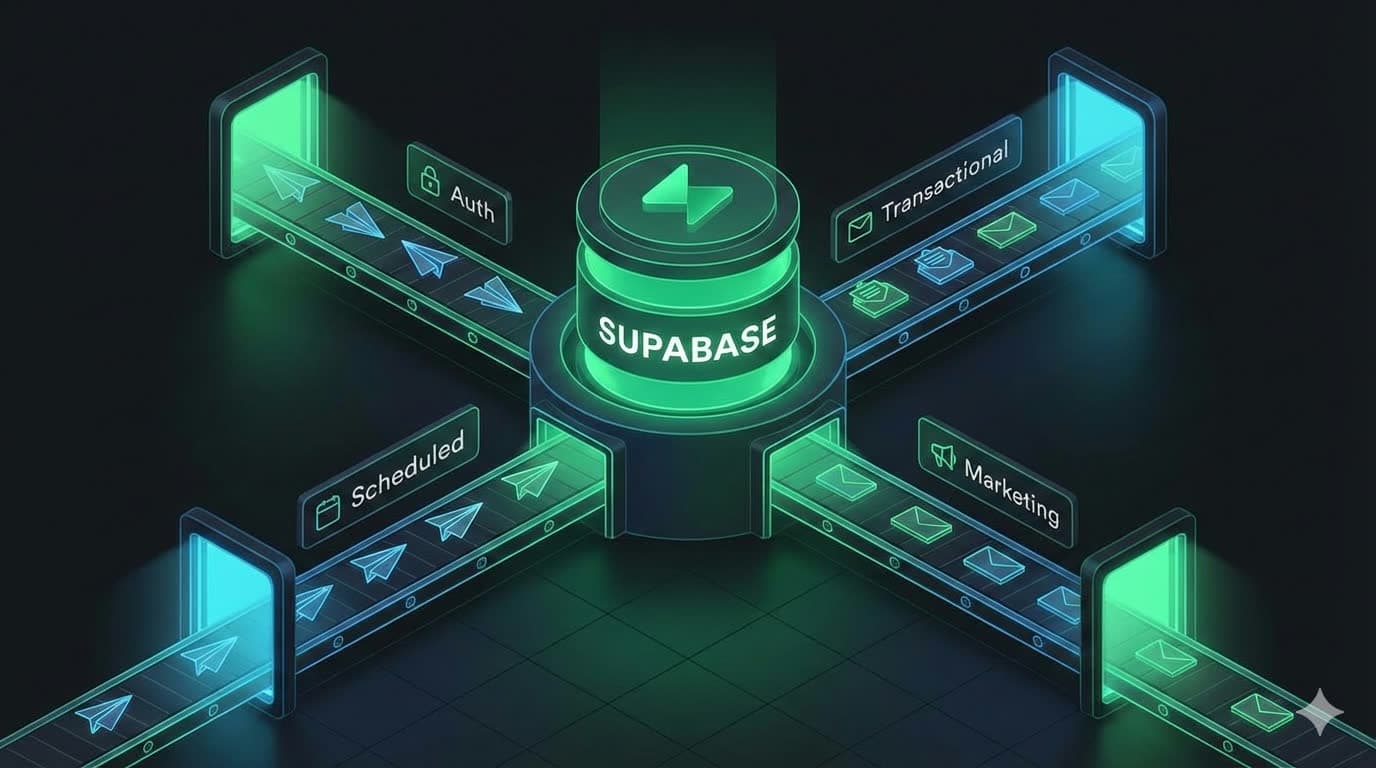
Building on Supabase gives you a rock-solid foundation: database, authentication, and APIs all in one place. But every app needs email: welcome messages, magic links, order confirmations, weekly digests. Email is still the backbone of user communication.
If you're trying to send emails from Supabase, the challenge isn't whether you need them. It's choosing the right approach for each type, from auth emails to transactional notifications to scheduled campaigns.
Last updated: February 2026. Validated against Supabase Auth SMTP docs, Auth rate limits, and send-email hook docs.
Ready to set up auth emails? Here's our step-by-step Supabase auth email guide.
The four types of emails
Treat auth, transactional, scheduled, and marketing as separate systems: they have different reliability, compliance, and operational requirements.
Before we talk implementation, let's map out the email landscape. Most apps send four distinct types of emails:
1. Authentication emails
These are the automated messages that handle account security and onboarding:
- Signup confirmation ("Verify your email address")
- Magic login links
- Password reset requests
- Email change verification
These emails are critical for user trust and security. The good news? Supabase handles most of this infrastructure for you.
2. Transactional emails
Real-time notifications triggered by user actions or system events:
- Order confirmations and receipts
- Comment notifications ("Someone replied to your post")
- System alerts and warnings
- Status updates ("Your export is ready")
These are time-sensitive and directly tied to user activity.
3. Scheduled emails
Summary messages compiled and sent on either some cadence or delay after an event:
- Daily or weekly content roundups
- Monthly account summaries or digests
- Usage reports
- Reminder emails
4. Marketing & promotional emails
Messages not triggered by specific user actions, including one-off emails:
- Welcome email drips
- Product announcements
- Feature highlights
- Special offers and promotions
These often require careful targeting and compliance (think: unsubscribe links).
What Supabase handles out of the box
What Supabase covers vs. what you need to build
| Email type | Built in? | What you need |
|---|---|---|
| Auth (magic links, resets, confirmations) | SMTP provider or managed solution | |
| Transactional (order confirmations, alerts) | Email API, webhooks, or managed solution | |
| Scheduled (digests, reminders) | Cron job + email API, or managed solution | |
| Marketing (drips, campaigns) | Marketing platform or managed solution |
Let's start with what Supabase gives you for free.
Supabase's auth email service
For authentication emails, you get convenient APIs that, when invoked, prepare and send the appropriate emails. These include emails for:
| Email Type | Supabase API Method | When to Use |
|---|---|---|
| Password Reset | supabase.auth.resetPasswordForEmail() | User clicks "Forgot Password" |
| Magic Link | supabase.auth.signInWithOtp() | For passwordless login (magic link or OTP) |
| Reauthentication | supabase.auth.reauthenticate() | Before password change (if Secure Password Change enabled) |
| Email Change | supabase.auth.updateUser({email}) | Changing user email (if Secure Email Change enabled) |
| Confirm Email | supabase.auth.signUp() | New user registration (if Confirm Email enabled) |
| Invite Link | supabase.auth.admin.inviteUserByEmail() | Admin inviting new users |
For instance, sending a magic link email is a single line of code:
const { data, error } = await supabase.auth.signInWithOtp({
  email: 'your.user.email@gmail.com',
  options: {
    emailRedirectTo: 'https://your-app.com/welcome',
  },
})
Supabase handles funneling the right data to the email, and provides a default template for each email.
However, the default sender is not designed for production use. It has strict limits, so plan to switch before going live:
- Only delivers to authorized addresses (your team members)
- Extremely low rate limits (2 emails/hour)
- Comes from a shared email address (from supabase.io) vs your own custom email domain
- No reliability guarantees
To set up a custom email sender for Supabase Auth, you have a few options:
Option 1: Configure SMTP
One option to configure your custom email sender is to set up a custom SMTP provider. This means, when you invoke the appropriate auth Supabase API, Supabase will still prepare the email, but it will send it to the SMTP provider which will actually send the email.
- Pick an SMTP provider (see below)
- Under Auth → Email Settings in the Supabase dashboard, enable "Custom SMTP"
- Add your provider's credentials:
- SMTP host and port
- Username and password
- From address
- Go back to the Supabase auth dashboard email templates and manually edit the templates to your liking. You'll want to ensure the copy is professional and avoids being marked as spam, and the template design looks visually appealing in various email clients and devices.
Popular SMTP providers that work great with Supabase include:
Not sure which provider to pick? Our SendGrid alternatives comparison covers pricing and trade-offs for seven providers.
Drawbacks to this approach:
- Must select an SMTP provider and manually manage credentials.
- Basic email templates must still be customized to match branding.
- Supabase's email editor is rudimentary, with no AI to assist with customization, or ability to preview with live data.
Option 2: Setup custom auth hook
If you don't want to use Supabase's email editor, then you can set up a custom Auth Hook that intercepts the email sending process, and lets you invoke an HTTP request to a third-party email service that actually manages the email sending.
On a high level, the process looks like this:
- Create a new Supabase function locally
- Edit the handler function to prep and invoke the email sending service
- Create the email template
- Deploy the function to your Supabase project
- Add secret keys
- Configure the Send Email hook in your Supabase project UI to intercept the email sending process and invoke your edge function
As you can tell, this is more involved than the SMTP approach, but it gives you more control over the email sending process, including template management.
Drawbacks to this approach:
- Much more technically involved
- HTTP request is being sent by your database, which puts load on your database
- Some emails may be dropped unless you setup error handling and retry mechanisms
- No easy way to test the flow without setting up additional infrastructure
Option 3: Use a fully-managed solution
If you don't want to deal with all the complexity of either setting up SMTP or a custom auth hook, then you can use a fully-managed solution like Dreamlit.
With Dreamlit, securely connect your Supabase account via an OAuth flow, confirm that you want auth emails configured via Dreamlit, and the setup process handles the hook and template wiring for you.
It'll automatically:
- set up a custom auth hook that routes auth emails through Dreamlit and reduces direct delivery work in your app/database layer
- set up 6 starter templates with production-style copy and branding, then let you iterate through the AI editor
You keep most of the control benefits from the custom auth hook approach, with less implementation and maintenance work. You still need to validate sender-domain DNS and monitor deliverability outcomes.
Sending transactional and scheduled emails from Supabase
Once your app goes live, you'll quickly need emails beyond authentication: purchase confirmations, comment notifications, daily summaries. Supabase doesn't have a built-in "email module" for these, so you'll need to choose an implementation approach.
Approach 1: Inline emails in your app logic
The most straightforward approach is sending emails directly from your application code when events occur. In your backend code, it might look like this:
// After saving a new comment, send notification
const comment = await saveCommentToDB(postId, authorId, content);

// Send notification email via API
await fetch("https://api.resend.com/emails", {
  method: "POST",
  headers: {
    "Authorization": `Bearer ${RESEND_API_KEY}`,
    "Content-Type": "application/json"
  },
  body: JSON.stringify({
    from: "noreply@yourapp.com",
    to: postAuthor.email,
    subject: `New comment on "${post.title}"`,
    html: `<p>${comment.authorName} commented: "${content}"</p>`
  })
});
Pros:
- Simple to understand and implement
- Everything happens in one place
- Direct control over timing
Cons:
- Email logic scattered across your codebase
- Changes require code deployments
- Slow email APIs can delay user actions
- Hard to maintain as you scale
This approach works fine for MVPs, but quickly becomes unwieldy as your app grows.
Approach 2: Queue-based email systems
This is how large companies like Google and Meta handle sending large volumes of emails in a scalable way. The codebase simply emits events to a queue, and a separate background process sends emails from that queue:
- When an event requires an email, append a job to a queue service like Kafka or SQS.
- A background worker listens for new events in the queue, and when it sees a new event, it sends an email.
- Failed emails can be retried automatically.
Advantages:
- Handles provider outages gracefully
- Built-in retry and rate limiting logic
- Can batch emails for efficiency
- Email sending is decoupled from app logic
Challenges:
- Quite complex to implement, with significant infrastructure setup and monitoring needed
- Requires queue monitoring
- Overkill for most startups
You can use notification services like Knock.app, Courier, or CustomerIO to mitigate some of the complexity, but you still have the tight dependency between the codebase with the email sending logic, and these services can get pricey as you scale.
Approach 3: Event-driven emails via database webhooks
A great hybrid solution between the two approaches above is to use your database as the event source. When data changes, emails get triggered automatically based on that change.
For instance, if you have a comments table, you can configure a listener to trigger an email when a new comment is created.
This pattern shines when you have multiple events that trigger emails. Your app just writes to the database, and emails happen automatically in the background.
You could use either Supabase Database Webhooks, or a fully-managed solution like Dreamlit.
Supabase Webhooks
Supabase offers Database Webhooks that call HTTP endpoints when rows change. Here's how it works:
- Configure a webhook on your
commentstable for INSERT events - Point it to a Supabase Edge Function URL (or Vercel Function URL)
- The function receives the new comment data and sends the email
// Edge Function that receives webhook. Hosted at some url like https://your-app.com/api/webhooks/comments
export async function handler(req) {
  const { record } = await req.json(); // New comment data

  // Fetch related data
  const { postAuthor, post } = await getPostDetails(record.post_id);

  // Send email
  await sendEmail({
    to: postAuthor.email,
    subject: `New comment on "${post.title}"`,
    // ... rest of email
  });
}
Benefits:
- Decouples email sending from user actions
- Database changes automatically trigger emails
- Email delays don't affect user experience
Trade-offs:
- Need to monitor webhook endpoints
- Database based webhooks are not as reliable and push some load to your database
- Requires setup for each event and to manage different environments
- No easy way to test the email sending logic
Approach 4: Use a fully-managed solution
If you want the benefits of an event-driven email approach but without the drawbacks of technical setup complexities, you can use a fully-managed solution like Dreamlit.
After connecting your Supabase database, you can simply ask the AI to build you a workflow, and it will set everything up for you, from defining the database trigger to pulling in the right data, to designing the email template. Zero code changes required.
Benefits:
- No need to manage webhook endpoints
- No need to manage different environments (just connect your production database to Dreamlit)
- Testing and simulation tools built-in
- Use Dreamlit's visual editor to build your email HTML
- Scales with your app automatically, with built-in retry logic, monitoring, rate limiting, and more.
Trade-offs:
- Requires one-time setup to connect Dreamlit to your Supabase database.
Scheduled emails
For emails to your users that involve a temporal component, either in the form of a delay or a schedule, you'll need to setup some sort of recurring cron job.
Every time the cron job runs, it queries the database for users that meet the criteria for the email, then prepares and sends messages to each of those users.
Even if you use a notification service like Knock.app, Courier, or CustomerIO, you'll still need to host a cron job to fetch the data and emit events.
There are several ways to host a cron job, including:
- GitHub Actions
- Supabase cron
- Vercel cron
The key challenge with these emails is managing the query and job complexity as your user base grows.
If you don't want to deal with all this complexity / additional infrastructure, you can use a service like Dreamlit to setup "scheduled workflows" to kick off emails on a recurring basis against the latest data in your database.
Supabase marketing emails and data sync
Marketing emails introduce a unique challenge: data synchronization.
Traditional email marketing tools (Mailchimp, Klaviyo, etc.) are powerful but create a fundamental problem: your user data lives in Supabase, but the email tool needs its own copy. This leads to:
- Manual CSV exports and imports
- Complex API integrations to sync users
- Out-of-sync subscriber lists
- Accidental emails to deleted accounts
Here's a typical onboarding flow with an external tool:
- User signs up (data in Supabase)
- Webhook or script sends user to email service
- Email service manages the drip campaign
- Hope the two systems stay in sync
Every sync point is a potential failure. You might email users who've already churned or miss new signups entirely.
A unified approach with Dreamlit
Instead of juggling multiple email systems and sync scripts, connect directly to your Supabase database and use it as the single source of truth. That's the approach Dreamlit takes.
Database-driven everything. Changes in your Postgres data trigger workflows in real time. New order? Trigger an email. User hasn't logged in for 30 days? Send a re-engagement campaign. Everything flows from your database, no webhooks to maintain, no cron jobs to monitor.
Zero sync required. Since Dreamlit reads directly from your database, there's no data to export or sync. Want to email all users on the free plan? Create a workflow with that condition. The query runs against live data, so it's always accurate.
AI-powered templates. The Workflow Agent generates end-to-end, production-ready workflows (templates and copy included) from plain-English prompts. Developers, marketers, and founders can all build and manage email workflows without writing code.
Which Supabase email approach to choose
SMTP is the fastest path for auth emails, webhooks are a solid middle ground for product-triggered email, and queues or managed workflows tend to win as volume and reliability expectations grow.
Here's how all the approaches stack up:
Supabase email approaches compared
| Approach | Covers | Complexity | Templates | Reliability |
|---|---|---|---|---|
| SMTP config | Auth only | Low | Basic (Supabase editor) | Provider-dependent |
| Custom auth hook | Auth only | High | Full | You manage retries |
| Inline API calls | Transactional | Low | Full (in code) | You manage retries |
| Queue-based | Transactional, scheduled | High | Full (in code) | Built-in retries |
| Database webhooks | Transactional | Medium | Full (in code) | DB-dependent |
| Dreamlit | All types | Low | AI-assisted | Managed |
For early-stage apps and MVPs, inline email sending might be perfectly adequate. As you grow, event-driven patterns provide a better separation of concerns. For a pricing and feature breakdown across providers, see Resend vs SendGrid vs Dreamlit.
Here's the thing: unless email infrastructure is your core competency, you probably have better things to build. The best email system is the one that lets you ship features instead of maintaining infrastructure, scales without major rewrites, and keeps your data in one place.
References
- Supabase Auth SMTP docs
- Supabase Auth rate limits
- Supabase send-email auth hook
- Supabase Database Webhooks
- Supabase Cron
Happy building, and may your emails always reach the inbox!
Want to see how Dreamlit can simplify your Supabase email workflows? Check out our documentation or try it free.
Frequently asked questions
Can I send emails using Supabase?
Yes. Supabase handles authentication emails (magic links, password resets, signup confirmations) out of the box. For transactional, scheduled, and marketing emails you need to add a custom SMTP provider, a webhook-based setup, or a fully managed solution like Dreamlit.
How many emails can Supabase send per hour?
Supabase's default email sender is limited to 2 emails per hour and only delivers to authorized addresses. To remove these limits, configure a custom SMTP provider or use a managed email service.
How do I customize Supabase auth email templates?
Go to Auth → Email Templates in your Supabase dashboard. You can edit the HTML for each auth email type (signup, magic link, password reset, etc.). For more control and AI-assisted design, you can set up a custom auth hook or use a managed solution like Dreamlit.
How do I send notifications from Supabase?
You can send notifications by calling an email API inline in your app code, using a queue-based system, setting up Supabase Database Webhooks to trigger emails on data changes, or connecting a fully managed tool like Dreamlit that securely connects to your database and reacts to changes automatically.
Does Supabase support SMTP?
Yes. Under Auth → Email Settings in the Supabase dashboard you can enable Custom SMTP and add your provider's host, port, username, password, and from address. Popular providers include SendGrid, Postmark, Amazon SES, and Resend.
What is the best email service for Supabase?
It depends on your constraints. Resend or Postmark are simple SMTP/API choices, Amazon SES is often the lowest cost at higher volumes, and managed platforms can reduce engineering overhead when you need auth, transactional, and scheduled workflows in one place.
About the Author
Co-Founder
Ajay is CEO and Co-Founder of Dreamlit AI. His job is to get Dreamlit in front of the businesses that need it and to make sure the company scales in a way that actually works. Full bio →
Other articles

7 Best SendGrid Alternatives in 2026 (Free + Paid)
Seven SendGrid alternatives compared on current pricing, free plans, architecture, developer experience, and migration effort for 2026, plus where Dreamlit fits.
Thinking in Database-Driven Notifications
What are database-driven notifications and how do they matter?