> ## Documentation Index
> Fetch the complete documentation index at: https://notikaai.mintlify.site/llms.txt
> Use this file to discover all available pages before exploring further.

# Fix Supabase RLS Access for Dreamlit

> If Dreamlit can't read a new Supabase table, it probably needs a SELECT RLS policy for dreamlit_app. Here's how to add one.

export const SupabaseRlsSqlBuilder = () => {
  const [schema, setSchema] = useState("public");
  const [table, setTable] = useState("your_table");
  const [copyLabel, setCopyLabel] = useState("Copy SQL");
  const inputStyle = {
    padding: "6px 8px",
    border: "1px solid #d1d5db",
    borderRadius: 6,
    fontSize: 13,
    width: "100%",
    boxSizing: "border-box"
  };
  const labelStyle = {
    fontSize: 12,
    fontWeight: 600,
    color: "#374151",
    marginBottom: 4
  };
  const quoteIdent = value => `"${value.replace(/"/g, '""')}"`;
  const sql = useMemo(() => {
    const schemaName = schema.trim() || "public";
    const tableName = table.trim() || "your_table";
    const policyName = "dreamlit_dreamlit_app_select_policy";
    const targetRole = "dreamlit_app";
    const tableRef = `${quoteIdent(schemaName)}.${quoteIdent(tableName)}`;
    const statements = [`DROP POLICY IF EXISTS ${quoteIdent(policyName)} ON ${tableRef};`, `CREATE POLICY ${quoteIdent(policyName)}
ON ${tableRef}
FOR SELECT
TO ${quoteIdent(targetRole)}
USING (true);`];
    return statements.join("\n\n");
  }, [schema, table]);
  const handleCopy = async () => {
    try {
      await navigator.clipboard.writeText(sql);
      setCopyLabel("Copied!");
      setTimeout(() => setCopyLabel("Copy SQL"), 1800);
    } catch {
      setCopyLabel("Copy failed");
      setTimeout(() => setCopyLabel("Copy SQL"), 1800);
    }
  };
  return <div style={{
    border: "1px solid #e5e7eb",
    borderRadius: 10,
    padding: 14,
    background: "#fafafa",
    margin: "16px 0"
  }}>
      <div style={{
    fontSize: 13,
    color: "#4b5563",
    marginBottom: 12,
    lineHeight: 1.5
  }}>
        This SQL uses the same read-only policy shape Dreamlit provisions.
      </div>

      <div style={{
    display: "grid",
    gridTemplateColumns: "1fr 1fr",
    gap: 10,
    marginBottom: 10
  }}>
        <div>
          <div style={labelStyle}>Schema</div>
          <input value={schema} onChange={e => setSchema(e.target.value)} placeholder="public" style={inputStyle} />
        </div>
        <div>
          <div style={labelStyle}>Table</div>
          <input value={table} onChange={e => setTable(e.target.value)} placeholder="your_table" style={inputStyle} />
        </div>
      </div>

      <div style={{
    marginBottom: 10
  }}>
        <div style={{
    ...labelStyle,
    marginBottom: 6
  }}>SQL</div>
        <pre style={{
    border: "1px solid #d1d5db",
    borderRadius: 8,
    background: "#111827",
    color: "#e5e7eb",
    padding: 12,
    fontSize: 12,
    lineHeight: 1.5,
    overflowX: "auto",
    whiteSpace: "pre-wrap"
  }}>
          {sql}
        </pre>
      </div>

      <button onClick={handleCopy} style={{
    background: "#111827",
    color: "white",
    border: "none",
    borderRadius: 6,
    padding: "8px 12px",
    fontSize: 13,
    cursor: "pointer"
  }}>
        {copyLabel}
      </button>
    </div>;
};

export const DreamlitSchemaRlsFixBuilder = ({mode = "disable"}) => {
  const [copyLabel, setCopyLabel] = useState("Copy SQL");
  const labelStyle = {
    fontSize: 12,
    fontWeight: 600,
    color: "#374151",
    marginBottom: 6
  };
  const isPolicyMode = mode === "policies";
  const sql = useMemo(() => {
    if (isPolicyMode) {
      return `DROP POLICY IF EXISTS "dreamlit_dreamlit_app_all_policy" ON dreamlit.event_log;
CREATE POLICY "dreamlit_dreamlit_app_all_policy"
ON dreamlit.event_log
FOR ALL
TO dreamlit_app
USING (true)
WITH CHECK (true);

DROP POLICY IF EXISTS "dreamlit_dreamlit_app_all_policy" ON dreamlit.error_log;
CREATE POLICY "dreamlit_dreamlit_app_all_policy"
ON dreamlit.error_log
FOR ALL
TO dreamlit_app
USING (true)
WITH CHECK (true);

DROP POLICY IF EXISTS "dreamlit_dreamlit_app_all_policy" ON dreamlit.version;
CREATE POLICY "dreamlit_dreamlit_app_all_policy"
ON dreamlit.version
FOR ALL
TO dreamlit_app
USING (true)
WITH CHECK (true);`;
    }
    return `ALTER TABLE dreamlit.event_log DISABLE ROW LEVEL SECURITY;
ALTER TABLE dreamlit.error_log DISABLE ROW LEVEL SECURITY;
ALTER TABLE dreamlit.version DISABLE ROW LEVEL SECURITY;`;
  }, [isPolicyMode]);
  const handleCopy = async () => {
    try {
      await navigator.clipboard.writeText(sql);
      setCopyLabel("Copied!");
      setTimeout(() => setCopyLabel("Copy SQL"), 1800);
    } catch {
      setCopyLabel("Copy failed");
      setTimeout(() => setCopyLabel("Copy SQL"), 1800);
    }
  };
  return <div style={{
    border: "1px solid #e5e7eb",
    borderRadius: 10,
    padding: 14,
    background: "#fafafa",
    margin: "16px 0"
  }}>
      <div style={{
    fontSize: 13,
    color: "#4b5563",
    marginBottom: 12,
    lineHeight: 1.5
  }}>
        {isPolicyMode ? "This SQL adds full-access dreamlit_app policies across Dreamlit's internal tables." : "This SQL disables RLS on Dreamlit's internal tables."}
      </div>

      <div style={{
    marginBottom: 10
  }}>
        <div style={{
    ...labelStyle,
    marginBottom: 6
  }}>SQL</div>
        <pre style={{
    border: "1px solid #d1d5db",
    borderRadius: 8,
    background: "#111827",
    color: "#e5e7eb",
    padding: 12,
    fontSize: 12,
    lineHeight: 1.5,
    overflowX: "auto",
    whiteSpace: "pre-wrap"
  }}>
          {sql}
        </pre>
      </div>

      <button onClick={handleCopy} style={{
    background: "#111827",
    color: "white",
    border: "none",
    borderRadius: 6,
    padding: "8px 12px",
    fontSize: 13,
    cursor: "pointer"
  }}>
        {copyLabel}
      </button>
    </div>;
};

export const CopyPromptCard = ({title = "Copy Prompt", description, prompt, buttonLabel = "Copy Prompt"}) => {
  const [copyLabel, setCopyLabel] = useState(buttonLabel);
  const handleCopy = async () => {
    try {
      await navigator.clipboard.writeText(prompt || "");
      setCopyLabel("Copied!");
      setTimeout(() => setCopyLabel(buttonLabel), 1800);
    } catch {
      setCopyLabel("Copy failed");
      setTimeout(() => setCopyLabel(buttonLabel), 1800);
    }
  };
  return <div style={{
    border: "1px solid #e5e7eb",
    borderRadius: 10,
    padding: 14,
    background: "#fafafa",
    margin: "16px 0"
  }}>
      <div style={{
    fontSize: 14,
    fontWeight: 600,
    color: "#111827",
    marginBottom: description ? 6 : 10
  }}>
        {title}
      </div>

      {description ? <div style={{
    fontSize: 13,
    color: "#4b5563",
    lineHeight: 1.5,
    marginBottom: 10
  }}>
          {description}
        </div> : null}

      <pre style={{
    border: "1px solid #d1d5db",
    borderRadius: 8,
    background: "#111827",
    color: "#e5e7eb",
    padding: 12,
    fontSize: 12,
    lineHeight: 1.5,
    overflowX: "auto",
    whiteSpace: "pre-wrap",
    marginBottom: 10
  }}>
        {prompt}
      </pre>

      <button onClick={handleCopy} style={{
    background: "#111827",
    color: "white",
    border: "none",
    borderRadius: 6,
    padding: "8px 12px",
    fontSize: 13,
    cursor: "pointer"
  }}>
        {copyLabel}
      </button>
    </div>;
};

Created a new Supabase table but Dreamlit can't read it? The most common cause:
Row Level Security (RLS) is enabled on the table but there's no policy granting
`dreamlit_app` read access yet.

## This guide assumes

* You use Supabase Cloud
* You connected Supabase to Dreamlit using Dreamlit's Supabase Connect OAuth flow
* Dreamlit created the `dreamlit_app` user for you

If you self-host Supabase or connected it as a generic Postgres database, your
steps may differ.

<Info>
  This only applies to tables that use RLS, and it's expected. PostgreSQL doesn't
  support default RLS policies for future tables, so each new RLS-enabled table
  needs its own policy.
</Info>

## How do I know if RLS is blocking Dreamlit?

* You created a new table after connecting Supabase to Dreamlit
* The table has data in it, but Dreamlit can't preview any rows
* You try to publish or configure something in Dreamlit and hit a database access error

Pick the approach that fits your workflow:

1. [Use the Supabase UI](#use-the-supabase-ui)
2. [Ask your AI](#ask-your-ai)
3. [Use SQL](#use-sql)

## Use the Supabase UI

<Steps>
  <Step title="Open the Policies page in Supabase">
    In Supabase, go to **Authentication → Configuration → Policies**.

    If your dashboard uses a slightly different layout, look for
    **Authentication → Policies**.
  </Step>

  <Step title="Select the table and create a policy">
    Find your new table in the Policies page.

    Create a new policy from scratch.
  </Step>

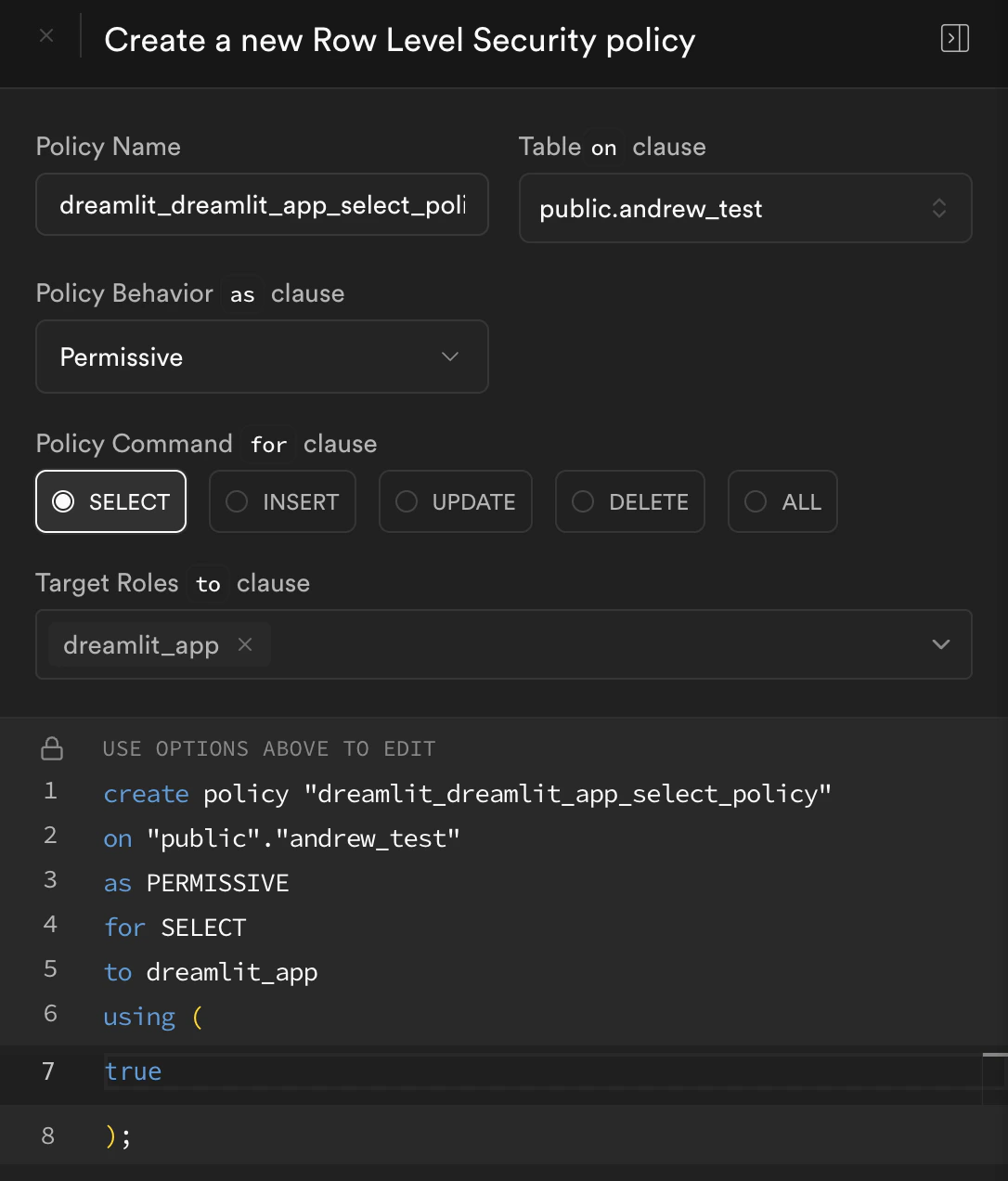
  <Step title="Fill the policy to match Dreamlit's setup">
    Use these values:

    | Field                | Value                                 |
    | -------------------- | ------------------------------------- |
    | **Policy name**      | `dreamlit_dreamlit_app_select_policy` |
    | **Command / action** | `SELECT`                              |
    | **Target role**      | `dreamlit_app`                        |
    | **USING expression** | `true`                                |

    This mirrors the same policy Dreamlit applies during provisioning. It's
    read-only and doesn't allow inserts, updates, or deletes.

    If RLS isn't enabled yet for that table, turn it on first before saving
    the policy.

    <Frame caption="Add the Dreamlit read-only policy in the Supabase policy editor">
      <img src="https://mintcdn.com/notikaai/5oYlSr6CYnDtP1nH/images/supabase-rls.png?fit=max&auto=format&n=5oYlSr6CYnDtP1nH&q=85&s=28c5d63ad09cfc5dbdfd45b80aa64287" alt="Supabase policy editor configured with a SELECT policy for dreamlit_app" width="1086" height="1272" data-path="images/supabase-rls.png" />
    </Frame>
  </Step>

  <Step title="Save and retry in Dreamlit">
    Go back to Dreamlit and retry the action that was failing:

    * Reopen the workflow or table picker
    * Republish the workflow if needed
    * Retry the preview or trigger setup

    If the connection is paused, go to **Settings → Database Connections** and
    click **Resume connection**.
  </Step>
</Steps>

## Ask your AI

If you use Lovable, Cursor, v0, Bolt, Replit, or another AI assistant, ask it
to add the same `SELECT` policy for `dreamlit_app`.

<CopyPromptCard
  description="Use this when you want your AI to update Supabase or your migrations for you."
  prompt={`I connected Dreamlit to Supabase.

Please check the tables Dreamlit needs to read and ensure dreamlit_app has SELECT access.

If a table uses RLS, add or update a read-only policy for dreamlit_app:
- policy name: dreamlit_dreamlit_app_select_policy
- action: SELECT
- using expression: true

Do not add write access and do not use BYPASSRLS.`}
/>

## Use SQL

If you'd rather paste SQL into Supabase SQL Editor, use this builder.

<SupabaseRlsSqlBuilder />

## Check it worked

In Supabase, open the table's **Policies** view and confirm you can see a
policy with:

* name `dreamlit_dreamlit_app_select_policy`
* command `SELECT`
* target role `dreamlit_app`

Then go back to Dreamlit and retry the action.

## Why can't Dreamlit read new Supabase tables?

Dreamlit adds a permissive `SELECT` policy for `dreamlit_app` when it provisions
your Supabase connection, but that only covers tables that exist at that
moment. New tables need the same policy added manually.

Supabase encourages RLS, and tables created through the dashboard often start
with RLS enabled by default. How a table is created affects whether RLS is on:

* Tables created in the Supabase dashboard usually have RLS enabled by default
* Tables created via SQL or migrations need RLS enabled manually

For more background, see Supabase's [Row Level Security guide](https://supabase.com/docs/guides/database/postgres/row-level-security) and [Hardening the Data API](https://supabase.com/docs/guides/api/hardening-data-api).

## What if the table is still not visible?

If Dreamlit still can't read the table after adding the policy:

* **Check the table name**: make sure you used the correct schema and table name
* **Verify RLS is on**: make sure RLS is enabled on the table you added the policy to
* **Test without RLS**: temporarily disable RLS on that table to see if Dreamlit starts working
* **Check for schema errors**: if the error mentions `dreamlit.event_log` or the `dreamlit` schema, see [What if the error mentions the dreamlit schema?](#what-if-the-error-mentions-the-dreamlit-schema)

If Dreamlit works once RLS is disabled, the issue is with the table's
RLS configuration rather than the Dreamlit connection itself.

## What if the error mentions the dreamlit schema?

Sometimes the issue isn't your application table. RLS was turned on for
Dreamlit's own internal tables:

* `dreamlit.event_log`
* `dreamlit.error_log`
* `dreamlit.version`

Dreamlit needs full access to those internal tables to run correctly.

### Signs this is the issue

* Dreamlit can connect, but publish, resume, or verification fails
* The error mentions `dreamlit.event_log` or the `dreamlit` schema
* Disabling RLS on your application table didn't help

### Disable RLS on Dreamlit's internal tables

Disable RLS on Dreamlit's internal tables:

<DreamlitSchemaRlsFixBuilder mode="disable" />

After that, retry the action in Dreamlit.

### If you need to keep RLS on those tables

Add explicit RLS policies that give `dreamlit_app` the access it needs, or ask
your AI to make that change for you.

If you keep RLS on Dreamlit's internal tables, make sure `dreamlit_app` has
these permissions:

* `SELECT`, `INSERT`, `UPDATE`, and `DELETE` on `dreamlit.event_log`
* `SELECT`, `INSERT`, `UPDATE`, and `DELETE` on `dreamlit.error_log`
* `SELECT`, `INSERT`, `UPDATE`, and `DELETE` on `dreamlit.version`
<CopyPromptCard
  title="Copy Prompt"
  description="Use this when your AI manages your Supabase schema or migrations."
  prompt={`I connected Dreamlit to Supabase using Dreamlit's Supabase Connect flow.

Please check the dreamlit schema tables:
- dreamlit.event_log
- dreamlit.error_log
- dreamlit.version

If RLS is enabled on those tables, add explicit policies so dreamlit_app can
SELECT, INSERT, UPDATE, and DELETE on all three tables.

Do not change my application tables unless needed for this fix.`}
/>

<DreamlitSchemaRlsFixBuilder mode="policies" />
