> ## Documentation Index
> Fetch the complete documentation index at: https://notikaai.mintlify.site/llms.txt
> Use this file to discover all available pages before exploring further.
# Supabase
> How Dreamlit integrates with Supabase
Dreamlit securely connects to your Supabase project using OAuth2. No need to
manage any API keys, set up edge functions, or write any code. It's one-click to
set up.
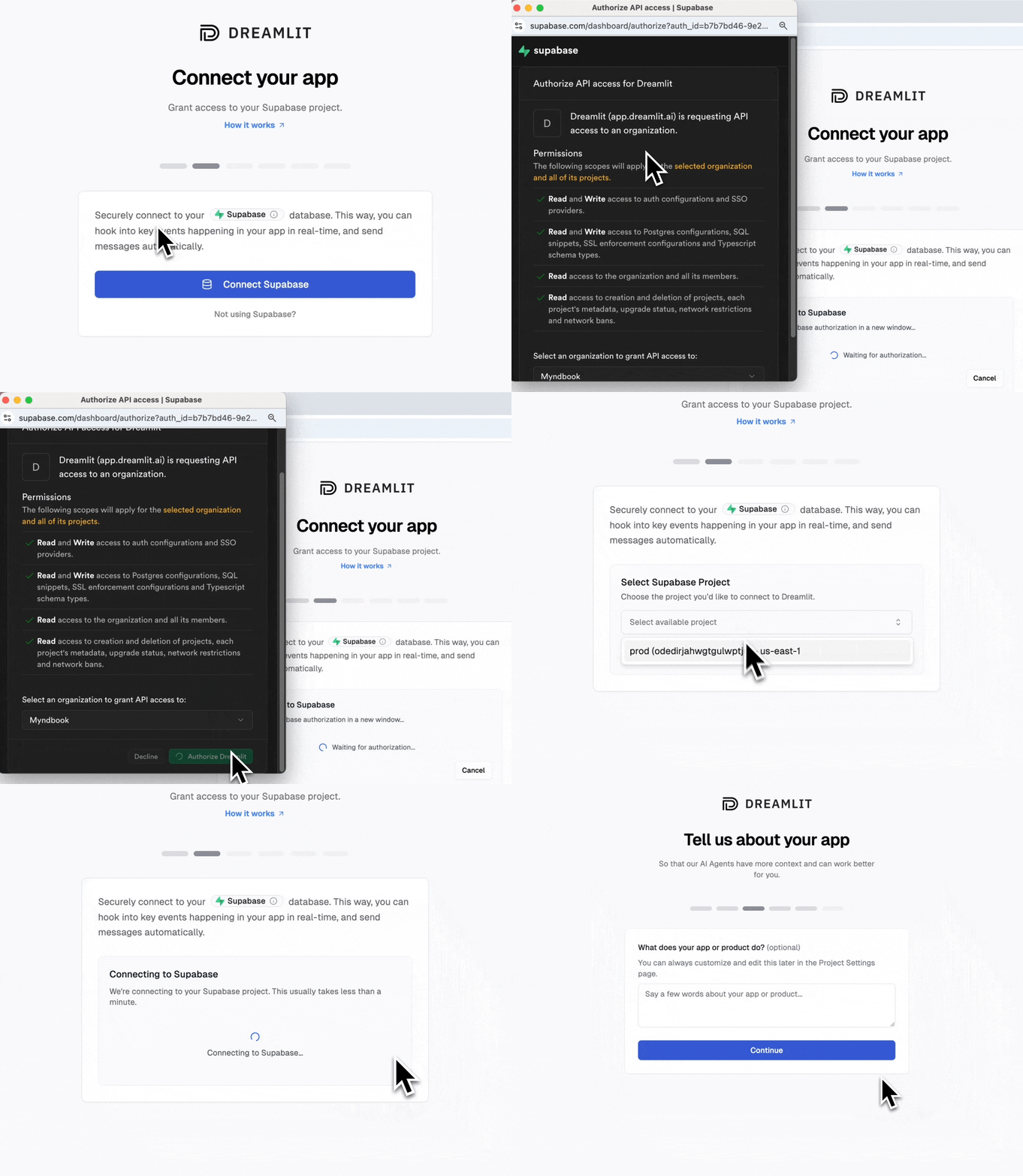 Behind the scenes, this authorization flow creates a separate `dreamlit_app` database user (following best practices of isolation and least privilege) that Dreamlit uses to connect to your database and manage your workflows.
You can always revoke Dreamlit's access by deleting the connection in the Dreamlit dashboard or by dropping the `dreamlit_app` database user in your database.
Dreamlit takes security seriously. To review all the measures we take, see [Security](/docs/resources/security).
## Supabase Auth emails
Supabase Auth email setup is available only when your database connection is
Supabase-managed (connected via Supabase Connect).
The default Supabase Auth configuration is not production-ready. This means if
you're using Supabase Auth for user authentication, you'll need to set up a
proper email sender for all your auth emails—otherwise your users will not
receive these critical emails from your app.
You [need custom auth emails](https://supabase.com/docs/guides/auth/auth-smtp) if you're using any of the following **authentication methods:**
* Email and password accounts
* Passwordless login (magic links or OTP sent via email)
* Email-based user invitations (from dashboard or admin APIs)
* Social login with email confirmation
Or if your app includes any of these features:
* User sign-up with email verification
* "Forgot password" functionality
* Account email changes that require confirmation
* Admin-invited users who receive invitation links
* Passwordless login where users click a link in their email
Supabase default auth setup is intended for:
* Exploring and getting started with Supabase Auth
* Testing templates with team members
* Toy projects, demos, or non-critical applications
But [not for production apps, real users, or any mission-critical application](https://github.com/orgs/supabase/discussions/15896).
As such, Supabase's built-in auth emails have severe limitations:
**1. Only sends to team members**
* **Blocks real users:** Emails only go to addresses in your project's team (managed in organization settings)
* **Error for everyone else:** Non-team addresses fail with "Email address not authorized"
* Example: If your team has 3 members, only those 3 email addresses can receive auth emails
**2. Extreme rate limits**
* Currently limited to **2 emails per hour** with Supabase's built-in email provider (can change without notice)
* This means only 2 password resets, sign-ups, or magic links per hour for your entire app
* Rate limits are subject to change at Supabase's discretion
**3. Poor deliverability**
* Sends from `noreply@mail.app.supabase.io` (runs the risk of being marked as spam)
**4. No reliability guarantees**
* No SLA for delivery or uptime
* Provided as "best-effort" only
* Explicitly stated as [not for production use](https://supabase.com/docs/guides/auth/auth-smtp)
Supabase provides two options for configuring email sending for Supabase Auth:
**Setup:** Add SMTP credentials in Supabase dashboard
**Pros:** Easier to get going compared with Auth Hooks
**Cons:** Still uses Supabase's basic templates, and must be customized in the Supabase dashboard (with no AI). Limited to their template variables. Must manage SMTP credentials.
**Setup:** Write and deploy webhook endpoints
**Pros:** Full control over emails
**Cons:** Requires backend development. Must handle email sending logic. Need to manage infrastructure. Complex error handling and retries
This is the approach that Dreamlit takes - but handles all the complexity for you behind the scenes. Simply authorize your Supabase project with Dreamlit, and click "Setup Supabase Auth".
Dreamlit handles the email delivery and templates only. Your app still owns the auth experience: it must call Supabase Auth APIs, configure any required redirect URLs in Supabase, and handle web callbacks or native deep links after a user opens an auth email.
For link-based auth, make sure your Supabase **Authentication -> URL Configuration** includes your production Site URL and every redirect URL your app passes through `redirectTo` or `emailRedirectTo`. Native apps also need the matching custom scheme or universal link configured in the app.
### Setup
It's just one more click to ensure your users are receiving auth emails. Dreamlit handles all the complexity for you behind the scenes.
Behind the scenes, this authorization flow creates a separate `dreamlit_app` database user (following best practices of isolation and least privilege) that Dreamlit uses to connect to your database and manage your workflows.
You can always revoke Dreamlit's access by deleting the connection in the Dreamlit dashboard or by dropping the `dreamlit_app` database user in your database.
Dreamlit takes security seriously. To review all the measures we take, see [Security](/docs/resources/security).
## Supabase Auth emails
Supabase Auth email setup is available only when your database connection is
Supabase-managed (connected via Supabase Connect).
The default Supabase Auth configuration is not production-ready. This means if
you're using Supabase Auth for user authentication, you'll need to set up a
proper email sender for all your auth emails—otherwise your users will not
receive these critical emails from your app.
You [need custom auth emails](https://supabase.com/docs/guides/auth/auth-smtp) if you're using any of the following **authentication methods:**
* Email and password accounts
* Passwordless login (magic links or OTP sent via email)
* Email-based user invitations (from dashboard or admin APIs)
* Social login with email confirmation
Or if your app includes any of these features:
* User sign-up with email verification
* "Forgot password" functionality
* Account email changes that require confirmation
* Admin-invited users who receive invitation links
* Passwordless login where users click a link in their email
Supabase default auth setup is intended for:
* Exploring and getting started with Supabase Auth
* Testing templates with team members
* Toy projects, demos, or non-critical applications
But [not for production apps, real users, or any mission-critical application](https://github.com/orgs/supabase/discussions/15896).
As such, Supabase's built-in auth emails have severe limitations:
**1. Only sends to team members**
* **Blocks real users:** Emails only go to addresses in your project's team (managed in organization settings)
* **Error for everyone else:** Non-team addresses fail with "Email address not authorized"
* Example: If your team has 3 members, only those 3 email addresses can receive auth emails
**2. Extreme rate limits**
* Currently limited to **2 emails per hour** with Supabase's built-in email provider (can change without notice)
* This means only 2 password resets, sign-ups, or magic links per hour for your entire app
* Rate limits are subject to change at Supabase's discretion
**3. Poor deliverability**
* Sends from `noreply@mail.app.supabase.io` (runs the risk of being marked as spam)
**4. No reliability guarantees**
* No SLA for delivery or uptime
* Provided as "best-effort" only
* Explicitly stated as [not for production use](https://supabase.com/docs/guides/auth/auth-smtp)
Supabase provides two options for configuring email sending for Supabase Auth:
**Setup:** Add SMTP credentials in Supabase dashboard
**Pros:** Easier to get going compared with Auth Hooks
**Cons:** Still uses Supabase's basic templates, and must be customized in the Supabase dashboard (with no AI). Limited to their template variables. Must manage SMTP credentials.
**Setup:** Write and deploy webhook endpoints
**Pros:** Full control over emails
**Cons:** Requires backend development. Must handle email sending logic. Need to manage infrastructure. Complex error handling and retries
This is the approach that Dreamlit takes - but handles all the complexity for you behind the scenes. Simply authorize your Supabase project with Dreamlit, and click "Setup Supabase Auth".
Dreamlit handles the email delivery and templates only. Your app still owns the auth experience: it must call Supabase Auth APIs, configure any required redirect URLs in Supabase, and handle web callbacks or native deep links after a user opens an auth email.
For link-based auth, make sure your Supabase **Authentication -> URL Configuration** includes your production Site URL and every redirect URL your app passes through `redirectTo` or `emailRedirectTo`. Native apps also need the matching custom scheme or universal link configured in the app.
### Setup
It's just one more click to ensure your users are receiving auth emails. Dreamlit handles all the complexity for you behind the scenes.
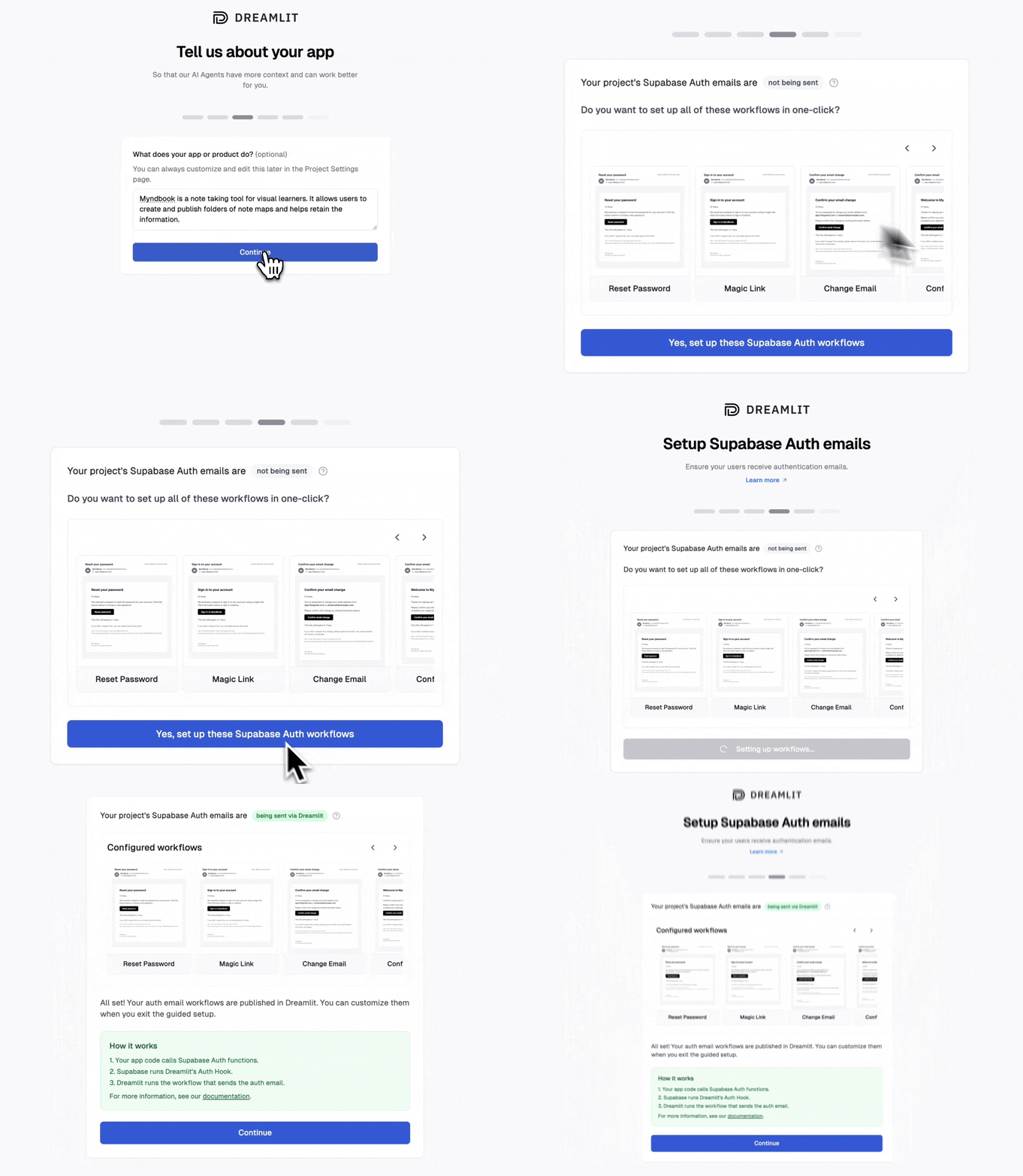 If you select "Skip" you can always configure it later in the **Settings -> Database Connections** page (in the connection's settings slideover).
You don't need to use all six email types to benefit from this setup. Dreamlit will automatically handle whichever auth email events your app actually triggers—whether that's one, two, or all six. The rest simply remain inactive until used.
**How Dreamlit configures Supabase Auth for you**
When you opt-in for Dreamlit to configure Supabase Auth for you, Dreamlit will:
* Setup a [Supabase Auth Hook](https://supabase.com/docs/guides/auth/auth-hooks/send-email-hook) for your Supabase project. The hook invokes a tiny custom Dreamlit managed function that simply logs the email event to the `dreamlit.event_log` table, allowing Dreamlit to start monitoring this event and trigger the appropriate workflow.
* Configure the Supabase Auth email, OTP, verification, and token refresh rate limits so legitimate auth traffic is not blocked by Supabase before Dreamlit can send the email. Dreamlit starts from Supabase's documented defaults for these limits, and you can raise them for higher-volume launches.
* Automatically create and publish **6 workflows** for you in Dreamlit, one for each of the auth email types in Supabase Auth (password reset, magic link, reauthentication, email change, confirm email, and invite link) that respond to the email events triggered by the auth hook.
* Generate beautiful default templates branded with your app name and sender.
If your app still hits Supabase Auth rate-limit errors after setup, go to **Dreamlit Settings -> Database Connections**, open your Supabase connection, and adjust **Auth rate limits** in the connection panel. You can also raise the relevant limit directly in your Supabase Dashboard under **Authentication -> Rate Limits**. Your Supabase Auth logs will name which one (usually email sends, OTP, verification, token refresh, or the email cooldown between requests to the same user). Dreamlit shows the email cooldown only when custom SMTP is not already configured. Size limits to your real production traffic with headroom for retries.
For link-based auth, make sure your Supabase **Authentication -> URL Configuration** includes your production Site URL and every redirect URL your app passes through `redirectTo` or `emailRedirectTo`. Native apps also need the matching custom scheme or universal link configured in the app.
Of course, you can customize these templates anytime using Dreamlit's workflow builder or by simply asking the Workflow AI to make changes. Want a different tone? New design? Additional content or personalization? Just describe what you want, and the AI will update everything accordingly.
If you have already configured Supabase Auth emails, Dreamlit will not overwrite
your existing configuration. To switch to Dreamlit, remove the existing
Supabase Auth email setup first.
### How to trigger Supabase Auth emails
When you configure auth emails through Dreamlit's setup process, we automatically install a Supabase Auth Hook in your project. This hook listens for Supabase auth events and routes them to Dreamlit for custom email delivery.
Note that Supabase Auth emails work differently than regular workflows in Dreamlit. They're triggered by Supabase API calls from your app, which Supabase relays to Dreamlit.
```mermaid theme={null}
sequenceDiagram
participant App as Your App
participant Supabase as Supabase Auth
participant Hook as Auth Hook
participant Dreamlit as Dreamlit
actor User as Your Users
App->>Supabase: Calls auth API
Supabase->>Hook: Triggers auth event
Hook->>Dreamlit: Forwards event
Dreamlit->>User: Sends custom email
```
This means auth emails ONLY trigger when your app calls Supabase auth APIs. Your app code must invoke the appropriate method for each email type:
| Email Type | Supabase API Method | When to Use |
| -------------------- | ----------------------------------------- | ---------------------------------------------------------- |
| **Password Reset** | `supabase.auth.resetPasswordForEmail()` | User clicks "Forgot Password" |
| **Magic Link** | `supabase.auth.signInWithOtp()` | For passwordless login (magic link or OTP) |
| **Reauthentication** | `supabase.auth.reauthenticate()` | Before password change (if Secure Password Change enabled) |
| **Email Change** | `supabase.auth.updateUser({email})` | Changing user email (if Secure Email Change enabled) |
| **Confirm Email** | `supabase.auth.signUp()` | New user registration (if Confirm Email enabled) |
| **Invite Link** | `supabase.auth.admin.inviteUserByEmail()` | Admin inviting new users |
**To reemphasize**: Supabase specific auth emails are not triggered by persisting events to your database. Auth emails only work through Supabase API calls.
**Note**: For passwordless email, Supabase uses `signInWithOtp()` for both clickable magic links and six-digit codes email variants. To decide what the user sees, either use `{{ ConfirmationURL }}` for a link or `{{ Token }}` for a code in the Magic Link email template in Dreamlit.
### Additional Supabase security emails
On December 3rd 2025, Supabase announced [Seven New Email Templates for Supabase Auth](https://supabase.com/blog/introducing-seven-new-email-templates-for-auth):
* **Password changed** - Notify users when their password has changed
* **Email address changed** - Notify users when their email address has changed
* Phone number changed - Notify users when their phone number has changed
* **Identity linked** - Notify users when a new identity (e.g.: GitHub) has been linked to their account
* **Identity unlinked** - Notify users when an identity (e.g.: GitHub) has been unlinked from their account
* **Multi-factor authentication (MFA) method added** - Notify users when a new multi-factor authentication method has been added to their account
* **Multi-factor authentication (MFA) method removed** - Notify users when a multi-factor authentication method has been removed from their account
To manage these email templates via Dreamlit, reach out to [support](/docs/resources/getting-support) and we can enable them for you.
## How Dreamlit interacts with your database
On a high level, Dreamlit needs to know where your data lives in your database, install database triggers (for database trigger workflows), and manage some housekeeping tables in a separate `dreamlit` schema (just like how Supabase manages objects for you in separate schemas like `auth` and `storage`).
This way:
* Dreamlit's AI can propose the relevant workflows for you by introspecting your database structure to understand the shape of your data and where it lives.
* You can preview your workflows with live database rows.
* You can react to new events happening in your app in real-time.
Dreamlit **never** edits, deletes, inserts, or otherwise modifies data in your database.
For a full technical deep dive, check out the [how it works](/docs/getting-started/how-it-works) page.
### `dreamlit_app` database user
When you first connect your Supabase project to Dreamlit via the OAuth2 flow, Supabase creates a separate `dreamlit_app` database user, [with minimal permissions](/docs/configuration/data-sources/postgres#permissions-needed). This is the database user that is then passed back to Dreamlit for use in your dashboard and workflows.
**What Dreamlit sets up for you (via Supabase Connect)**
* **Create dedicated Dreamlit user** — Creates `dreamlit_app` with a secure random password.
* **Minimal database access** — Grants `CONNECT`, `CREATE`, `TEMP` to the `dreamlit_app` user.
* **Read + trigger privileges** — Grants `USAGE` on schemas, `SELECT` + `TRIGGER` on tables, `USAGE` + `SELECT` on sequences, `EXECUTE` on functions to the `dreamlit_app` user.
* **Future-proof defaults** — Sets default privileges so new tables/sequences/functions remain readable by `dreamlit_app` without extra manual grants.
* **Supabase Auth access** — Grants `USAGE` + `SELECT` on the `auth` schema to the `dreamlit_app` user and a best-effort `authenticated` role grant for parity with Supabase defaults.
* **Dreamlit internal schema** — Creates the `dreamlit` schema and internal tables (`event_log`, `error_log`, `version`) used for workflow events and logging (owned by `postgres`, with scoped grants to Dreamlit and Supabase system roles).
* **RLS-friendly reads** — Adds a read-only `SELECT` policy for `dreamlit_app` on reachable tables that exist when the connection is provisioned. New RLS-enabled tables created later need that same policy added manually. See [Fix Supabase RLS Access for Dreamlit](/docs/troubleshooting/fix-supabase-rls-access).
* **Internal-table RLS** — Enables RLS on `dreamlit.event_log`, `dreamlit.error_log`, and `dreamlit.version` and adds matching full-access policies so Dreamlit can keep using its internal tables safely.
* **Auth schema table trigger management** — Adds `dreamlit_auth_create_trigger` + `dreamlit_auth_drop_trigger` helper functions in the `dreamlit` schema so Dreamlit can create/remove triggers on `auth.*` tables (Supabase doesn't allow granting `TRIGGER` on `auth` tables to non-admin roles).
**What we don't do**
* We don't write to, update, or delete rows in your application tables.
* We don't create triggers on your tables until you publish a workflow.
* We don't enable or modify Supabase Auth email hooks unless you explicitly opt in.
## New tables and RLS
If you create a new table after connecting Supabase to Dreamlit, Dreamlit may
not be able to read that table yet if RLS is enabled and the new table does not
have a policy for `dreamlit_app`.
This is only relevant for tables that use RLS. Not every Supabase app does.
This is expected. PostgreSQL supports default privileges for future tables, but
not default RLS policies for future tables.
If a new table is RLS-enabled, add a `SELECT` policy for `dreamlit_app` before
using that table in Dreamlit.
For the full fix guide, including Supabase UI steps, an AI prompt, and a SQL
builder, see [Fix Supabase RLS Access for Dreamlit](/docs/troubleshooting/fix-supabase-rls-access).
### Uninstalling Dreamlit
If you ever want to remove Dreamlit entirely:
1. **Unpublish** all workflows that depend on your Supabase connection (this removes triggers/functions).
2. **Delete** the connection in the Dreamlit dashboard. Dreamlit automatically cleans up the `dreamlit` schema, auth hook helpers, Dreamlit RLS policies, and the `dreamlit_app` role so it's like Dreamlit was never there.
If you have multiple Dreamlit connections pointing at the same Supabase project, we keep shared database artifacts in place until the last connection is removed.
That's it! By connecting Supabase to Dreamlit, you can create powerful,
real-time workflows triggered by database changes — without writing any custom
code in your application.
If you select "Skip" you can always configure it later in the **Settings -> Database Connections** page (in the connection's settings slideover).
You don't need to use all six email types to benefit from this setup. Dreamlit will automatically handle whichever auth email events your app actually triggers—whether that's one, two, or all six. The rest simply remain inactive until used.
**How Dreamlit configures Supabase Auth for you**
When you opt-in for Dreamlit to configure Supabase Auth for you, Dreamlit will:
* Setup a [Supabase Auth Hook](https://supabase.com/docs/guides/auth/auth-hooks/send-email-hook) for your Supabase project. The hook invokes a tiny custom Dreamlit managed function that simply logs the email event to the `dreamlit.event_log` table, allowing Dreamlit to start monitoring this event and trigger the appropriate workflow.
* Configure the Supabase Auth email, OTP, verification, and token refresh rate limits so legitimate auth traffic is not blocked by Supabase before Dreamlit can send the email. Dreamlit starts from Supabase's documented defaults for these limits, and you can raise them for higher-volume launches.
* Automatically create and publish **6 workflows** for you in Dreamlit, one for each of the auth email types in Supabase Auth (password reset, magic link, reauthentication, email change, confirm email, and invite link) that respond to the email events triggered by the auth hook.
* Generate beautiful default templates branded with your app name and sender.
If your app still hits Supabase Auth rate-limit errors after setup, go to **Dreamlit Settings -> Database Connections**, open your Supabase connection, and adjust **Auth rate limits** in the connection panel. You can also raise the relevant limit directly in your Supabase Dashboard under **Authentication -> Rate Limits**. Your Supabase Auth logs will name which one (usually email sends, OTP, verification, token refresh, or the email cooldown between requests to the same user). Dreamlit shows the email cooldown only when custom SMTP is not already configured. Size limits to your real production traffic with headroom for retries.
For link-based auth, make sure your Supabase **Authentication -> URL Configuration** includes your production Site URL and every redirect URL your app passes through `redirectTo` or `emailRedirectTo`. Native apps also need the matching custom scheme or universal link configured in the app.
Of course, you can customize these templates anytime using Dreamlit's workflow builder or by simply asking the Workflow AI to make changes. Want a different tone? New design? Additional content or personalization? Just describe what you want, and the AI will update everything accordingly.
If you have already configured Supabase Auth emails, Dreamlit will not overwrite
your existing configuration. To switch to Dreamlit, remove the existing
Supabase Auth email setup first.
### How to trigger Supabase Auth emails
When you configure auth emails through Dreamlit's setup process, we automatically install a Supabase Auth Hook in your project. This hook listens for Supabase auth events and routes them to Dreamlit for custom email delivery.
Note that Supabase Auth emails work differently than regular workflows in Dreamlit. They're triggered by Supabase API calls from your app, which Supabase relays to Dreamlit.
```mermaid theme={null}
sequenceDiagram
participant App as Your App
participant Supabase as Supabase Auth
participant Hook as Auth Hook
participant Dreamlit as Dreamlit
actor User as Your Users
App->>Supabase: Calls auth API
Supabase->>Hook: Triggers auth event
Hook->>Dreamlit: Forwards event
Dreamlit->>User: Sends custom email
```
This means auth emails ONLY trigger when your app calls Supabase auth APIs. Your app code must invoke the appropriate method for each email type:
| Email Type | Supabase API Method | When to Use |
| -------------------- | ----------------------------------------- | ---------------------------------------------------------- |
| **Password Reset** | `supabase.auth.resetPasswordForEmail()` | User clicks "Forgot Password" |
| **Magic Link** | `supabase.auth.signInWithOtp()` | For passwordless login (magic link or OTP) |
| **Reauthentication** | `supabase.auth.reauthenticate()` | Before password change (if Secure Password Change enabled) |
| **Email Change** | `supabase.auth.updateUser({email})` | Changing user email (if Secure Email Change enabled) |
| **Confirm Email** | `supabase.auth.signUp()` | New user registration (if Confirm Email enabled) |
| **Invite Link** | `supabase.auth.admin.inviteUserByEmail()` | Admin inviting new users |
**To reemphasize**: Supabase specific auth emails are not triggered by persisting events to your database. Auth emails only work through Supabase API calls.
**Note**: For passwordless email, Supabase uses `signInWithOtp()` for both clickable magic links and six-digit codes email variants. To decide what the user sees, either use `{{ ConfirmationURL }}` for a link or `{{ Token }}` for a code in the Magic Link email template in Dreamlit.
### Additional Supabase security emails
On December 3rd 2025, Supabase announced [Seven New Email Templates for Supabase Auth](https://supabase.com/blog/introducing-seven-new-email-templates-for-auth):
* **Password changed** - Notify users when their password has changed
* **Email address changed** - Notify users when their email address has changed
* Phone number changed - Notify users when their phone number has changed
* **Identity linked** - Notify users when a new identity (e.g.: GitHub) has been linked to their account
* **Identity unlinked** - Notify users when an identity (e.g.: GitHub) has been unlinked from their account
* **Multi-factor authentication (MFA) method added** - Notify users when a new multi-factor authentication method has been added to their account
* **Multi-factor authentication (MFA) method removed** - Notify users when a multi-factor authentication method has been removed from their account
To manage these email templates via Dreamlit, reach out to [support](/docs/resources/getting-support) and we can enable them for you.
## How Dreamlit interacts with your database
On a high level, Dreamlit needs to know where your data lives in your database, install database triggers (for database trigger workflows), and manage some housekeeping tables in a separate `dreamlit` schema (just like how Supabase manages objects for you in separate schemas like `auth` and `storage`).
This way:
* Dreamlit's AI can propose the relevant workflows for you by introspecting your database structure to understand the shape of your data and where it lives.
* You can preview your workflows with live database rows.
* You can react to new events happening in your app in real-time.
Dreamlit **never** edits, deletes, inserts, or otherwise modifies data in your database.
For a full technical deep dive, check out the [how it works](/docs/getting-started/how-it-works) page.
### `dreamlit_app` database user
When you first connect your Supabase project to Dreamlit via the OAuth2 flow, Supabase creates a separate `dreamlit_app` database user, [with minimal permissions](/docs/configuration/data-sources/postgres#permissions-needed). This is the database user that is then passed back to Dreamlit for use in your dashboard and workflows.
**What Dreamlit sets up for you (via Supabase Connect)**
* **Create dedicated Dreamlit user** — Creates `dreamlit_app` with a secure random password.
* **Minimal database access** — Grants `CONNECT`, `CREATE`, `TEMP` to the `dreamlit_app` user.
* **Read + trigger privileges** — Grants `USAGE` on schemas, `SELECT` + `TRIGGER` on tables, `USAGE` + `SELECT` on sequences, `EXECUTE` on functions to the `dreamlit_app` user.
* **Future-proof defaults** — Sets default privileges so new tables/sequences/functions remain readable by `dreamlit_app` without extra manual grants.
* **Supabase Auth access** — Grants `USAGE` + `SELECT` on the `auth` schema to the `dreamlit_app` user and a best-effort `authenticated` role grant for parity with Supabase defaults.
* **Dreamlit internal schema** — Creates the `dreamlit` schema and internal tables (`event_log`, `error_log`, `version`) used for workflow events and logging (owned by `postgres`, with scoped grants to Dreamlit and Supabase system roles).
* **RLS-friendly reads** — Adds a read-only `SELECT` policy for `dreamlit_app` on reachable tables that exist when the connection is provisioned. New RLS-enabled tables created later need that same policy added manually. See [Fix Supabase RLS Access for Dreamlit](/docs/troubleshooting/fix-supabase-rls-access).
* **Internal-table RLS** — Enables RLS on `dreamlit.event_log`, `dreamlit.error_log`, and `dreamlit.version` and adds matching full-access policies so Dreamlit can keep using its internal tables safely.
* **Auth schema table trigger management** — Adds `dreamlit_auth_create_trigger` + `dreamlit_auth_drop_trigger` helper functions in the `dreamlit` schema so Dreamlit can create/remove triggers on `auth.*` tables (Supabase doesn't allow granting `TRIGGER` on `auth` tables to non-admin roles).
**What we don't do**
* We don't write to, update, or delete rows in your application tables.
* We don't create triggers on your tables until you publish a workflow.
* We don't enable or modify Supabase Auth email hooks unless you explicitly opt in.
## New tables and RLS
If you create a new table after connecting Supabase to Dreamlit, Dreamlit may
not be able to read that table yet if RLS is enabled and the new table does not
have a policy for `dreamlit_app`.
This is only relevant for tables that use RLS. Not every Supabase app does.
This is expected. PostgreSQL supports default privileges for future tables, but
not default RLS policies for future tables.
If a new table is RLS-enabled, add a `SELECT` policy for `dreamlit_app` before
using that table in Dreamlit.
For the full fix guide, including Supabase UI steps, an AI prompt, and a SQL
builder, see [Fix Supabase RLS Access for Dreamlit](/docs/troubleshooting/fix-supabase-rls-access).
### Uninstalling Dreamlit
If you ever want to remove Dreamlit entirely:
1. **Unpublish** all workflows that depend on your Supabase connection (this removes triggers/functions).
2. **Delete** the connection in the Dreamlit dashboard. Dreamlit automatically cleans up the `dreamlit` schema, auth hook helpers, Dreamlit RLS policies, and the `dreamlit_app` role so it's like Dreamlit was never there.
If you have multiple Dreamlit connections pointing at the same Supabase project, we keep shared database artifacts in place until the last connection is removed.
That's it! By connecting Supabase to Dreamlit, you can create powerful,
real-time workflows triggered by database changes — without writing any custom
code in your application.